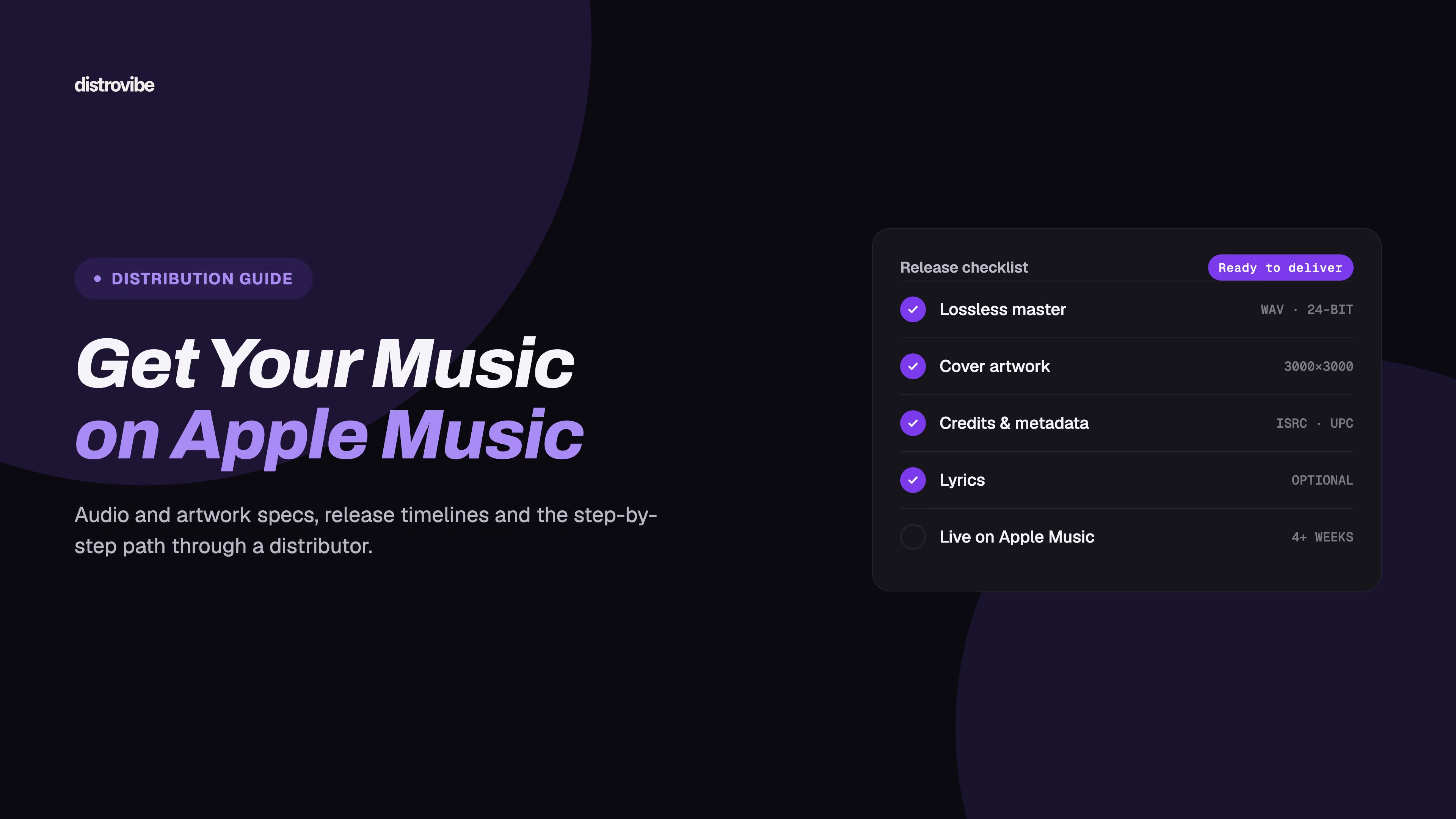
To get your music on Apple Music as an independent artist, you release it through a music distributor. Apple does not take direct uploads from most individual artists. Your distributor sends the audio, artwork and metadata to Apple in the format Apple requires. Prepare a lossless master, square cover art (3000 x 3000 pixels recommended), and clean metadata. Then submit the release a few weeks before your release date so there is time for review, delivery and pre-release promotion.
This guide covers how distribution to Apple Music works, the steps to release with DistroVibe, Apple's audio, artwork and lyrics requirements (checked against Apple's own documentation in October 2026), realistic timelines, pre-orders and pre-adds, and the most common reasons releases get sent back.
Key takeaways
Apple Music does not take direct uploads from most independent artists; releases reach Apple Music through a music distributor.
Apple Music cover art must be a square RGB JPG or PNG, 3000 x 3000 pixels recommended and 1400 x 1400 minimum.
Apple accepts lossless source audio (WAV, ALAC, CAF or FLAC) at 16-bit or 24-bit, and Apple Digital Masters requires a genuine 24-bit master.
Apple's editorial pitch deadline for full consideration is 10 days before release, so submitting a release 4+ weeks ahead leaves room for review and promotion.
Artists can claim Apple Music for Artists once their music has been live on Apple Music for at least five business days.
Can you upload music to Apple Music directly?
For almost everyone reading this, no. Apple says it works directly with labels and distributors that have large catalogs and the technical capacity to deliver to its specifications. It encourages independent artists and smaller labels to go through a distributor instead. Unlike SoundCloud, Apple Music has no "upload" button for artists. Apple Music for Artists is an analytics and profile tool, not an upload portal.
A distributor (sometimes called an aggregator) sits between you and the stores. It:
Packages your audio, artwork and metadata in the delivery format Apple and other stores require
Assigns or records your identifiers: an ISRC for each track and a UPC for the release
Handles questions from the store about metadata or assets
Collects your streaming and download income and pays it out to you
Sends corrections later, such as a fixed title or a changed release date. Apple's FAQ confirms that changes like these have to come through your distributor or label.
Apple also keeps a short list of "preferred" distribution partners. These partners support features like Dolby Atmos delivery, motion artwork, detailed credits and lyrics, and they have low rejection rates. You don't need a preferred partner to be on Apple Music: any distributor that delivers to Apple can get your release into the catalog. When you compare services, ask each one which Apple features it supports, especially if spatial audio or synced lyrics matter to you.
How to get your music on Apple Music with DistroVibe, step by step
DistroVibe delivers to Apple Music along with 450+ other stores and platforms, including Spotify, TIDAL, Amazon Music, YouTube Music, Deezer, TikTok, Instagram and Shazam. You can see the full list on our platforms page. Here's the process from finished master to live release.
Pick a plan. The Artist plan ($19.99/year) covers one artist profile with unlimited releases. On every plan you keep 100% of your streaming royalties. If you need more than one profile or a faster review, Artist Pro adds three profiles and the Express Fast-Lane review.
Create your release. Choose single, EP or album, and enter the release title, primary artist, any featured artists, genre and language.
Upload your audio. Upload a lossless export (WAV is the safe choice) of your final master, one file per track. Listen through each file first to make sure no intro or ending was cut off.
Upload your artwork. Use a square JPG or PNG in RGB. The next section has the exact specs.
Add track details. Enter songwriter and producer credits and set the explicit flag where needed. If a track already has an ISRC from an earlier release, reuse it.
Set up royalty splits (optional). If you share a song with collaborators, you can split earnings so each person is paid their share directly.
Choose the release date and stores. Pick a date at least three to four weeks out and make sure Apple Music is selected.
Submit for review. DistroVibe checks the release against store guidelines before delivery. Standard review takes 5–7 days. Express Fast-Lane review on Artist Pro and above takes 24–48 hours.
Promote before release day. Build a pre-release SmartLink so fans can find the release on Apple Music, Spotify and other services from one page.
Claim your artist profile. Once you're live, claim your page in Apple Music for Artists (more on this below).
If your master and artwork are ready, you can pick a DistroVibe plan from $1.99/month and start the release today.
Apple Music audio requirements
Apple publishes its delivery specs in the Apple Video and Audio Asset Guide. Your distributor converts your upload into Apple's package, but your source file still has to meet the baseline.
Stereo masters
Sample rate: 44.1, 48, 88.2, 96, 176.4 or 192 kHz
Bit depth: 16-bit or 24-bit
Formats Apple accepts: WAV (PCM), ALAC, CAF and FLAC. Apple does not accept MP3 or other lossy files as a source.
Channels: If a stereo version exists, you have to deliver it. Apple doesn't accept single-channel (mono) files. For a mono recording, deliver a stereo file with identical left and right channels.
A 16-bit/44.1 kHz WAV is the safe minimum. If your mastering engineer gave you a 24-bit file, upload that. Don't convert down first.
Apple Digital Masters
Apple Digital Masters is Apple's program for high-resolution masters. To qualify, audio must be delivered at 24-bit resolution at one of the same sample rates listed above. Apple's guidance also warns against upsampling: a 16-bit file converted to 24-bit doesn't count. Apple Music streams these masters in lossless form using ALAC. In practice: ask your mastering engineer for a true 24-bit master, leave a little headroom so there's no clipping, and upload that file as is.
Spatial Audio with Dolby Atmos
Apple says Spatial Audio releases earn a higher share of sound-recording royalties, up to 10% more than non-spatial content. The technical bar is high:
The Atmos mix is delivered as a BWF ADM file, 24-bit LPCM at 48 kHz or 96 kHz
Integrated loudness must not exceed -18 LKFS, and true peak must not exceed -1 dBTP
The mix has to be built from multitracks or stems. Apple doesn't accept an upmix of a stereo master or stems extracted from a finished stereo file.
Apple strongly recommends delivering a stereo version alongside the Atmos mix, synced to the same project
Atmos can only reach Apple through a distributor or encoding house that Apple has approved for Dolby Atmos delivery. If spatial audio is part of your plan, confirm Atmos support with your distributor before you book a mix. For DistroVibe, message us through the contact page and we'll tell you what we can deliver for your release.
Apple Music artwork requirements
Artwork is one of the most common reasons a release gets sent back. Apple's asset guide specifies:
Shape: a perfect square (1:1)
Size: 3000 x 3000 pixels recommended, 1400 x 1400 minimum. Don't enlarge a smaller image to reach the minimum.
Format: JPG or PNG
Color: RGB. Apple doesn't accept CMYK.
The Apple Music Style Guide adds content rules. Cover art must not be blurry, pixelated, misaligned or rotated, and it must not mislead (for example, by prominently showing an artist who isn't on the release). It also can't include:
Website addresses, social handles, QR codes or competitor logos
Prices or sales language, such as "Out now for $9.99"
Audio format badges, such as "Dolby Atmos" or "Lossless"
References to physical formats or other retailers
Keep any text on the cover consistent with your metadata. If the cover says one artist name and the release says another, expect questions.
Metadata and lyrics: getting the details right
Apple is stricter about text formatting than most stores. These style guide rules catch the most first-time artists:
Titles show only the title. Don't add "Single," "Official Audio," a release date, a track number or a format label. Apple adds "- Single" and "- EP" automatically.
Use standard capitalization. English titles use title case. Don't type a title in all caps or all lowercase unless that is genuinely how the artist writes it, and even then expect it to be checked.
Format featured artists correctly. Use "feat." in parentheses, and don't list a featured artist as a primary artist.
Put one artist in each artist field. Don't combine names in one field, and don't add roles, instruments or dates.
No generic names. Apple rejects artist names like "Lo-Fi Beats" or "Top Hits" because they read as genres or playlists, not as artists.
No emoji in titles, artist names or lyrics.
Use the explicit flag, not the title. Mark explicit tracks with the Parental Advisory flag. Don't write "(Explicit)" in the title or censor words with asterisks.
Lyrics have their own rules. They must match the recorded audio exactly. Lines start with a capital letter and don't end with a period or comma. Repeated sections are written out in full rather than as "(x3)." Stanzas are separated by a blank line. Time-synced lyrics must match the exact audio version you delivered. For a full pre-release checklist covering names, credits and identifiers, see our music metadata checklist.
How long does it take to get on Apple Music?
The total time depends on two things: your distributor's review and the store's processing. With DistroVibe, standard review takes 5–7 days, and Express Fast-Lane review on Artist Pro and above takes 24–48 hours. After delivery, Apple needs its own processing time before the release shows up correctly. That usually goes quickly, but it isn't instant, and nobody can guarantee an exact time. If you're releasing on Spotify at the same time, our four-week plan for releasing on Spotify and Apple Music covers both stores in one timeline.
A realistic plan for most independent releases:
When | What to do |
|---|---|
4+ weeks before release | Submit the release with final audio, artwork and metadata |
3 weeks before | Confirm delivery, build your pre-release SmartLink, start teasing |
10 days before | Apple's editorial pitch deadline for full consideration. Pitches go through the Apple Music Connect accounts of labels and distributors, so ask your distributor what's possible. |
Release day | Check your Apple Music page and share the live link |
About 1 week after | Claim your Apple Music for Artists profile (Apple requires at least five business days live) |
Submitting early also protects you if something gets flagged. A rejected cover can be fixed in a day when you have three weeks of buffer. With three days, it's a scramble.
Pre-orders and pre-adds on Apple Music
Apple offers two pre-release mechanics, and they're connected:
iTunes Store pre-order: fans buy the release before it comes out, and it downloads automatically on release day.
Apple Music pre-add: fans add an upcoming release to their library, and the full release appears there automatically when it goes live.
According to Apple's pre-release documentation, a pre-add requires an iTunes Store pre-order with at least one "instant gratification" track. That's a song fans can buy and stream right away while the rest of the release is still upcoming. The sales start date has to be at least one day in the future, and the release has to be cleared in the territories where you want the pre-add. Apple also notes that once an album is delivered, you can't add tracks or change the pre-order track sequence. So lock your tracklist before you submit.
Your distributor sets up pre-orders for you. Support for pre-orders and instant gratification tracks varies between distributors, so check it with yours before you announce one. Whatever your distributor offers, a pre-release SmartLink gives fans one page to save the release and follow you on every service, Apple Music included.
Common reasons Apple Music rejects a release
Most rejections are avoidable. These come up most often:
Artwork problems: wrong dimensions, not square, blurry or upscaled, or containing URLs, social handles, logos or prices.
Artwork that doesn't match the metadata: a different artist name or title on the cover than in the release details.
Extra words in titles: "Official Audio," "Prod. by…," "Single," or a year added to the title field.
Wrong artist formatting: several artists in one field, featured artists marked as primary, or generic artist names.
Capitalization: all caps or random casing that doesn't follow the style guide.
Wrong explicit handling: "(Explicit)" written in the title instead of the flag, or censored words in titles.
Audio issues: lossy source files, mono files, upsampled "24-bit" masters, or audio that doesn't match the title (such as a cut-off intro).
Rights problems: uncleared samples, or a cover song submitted as an original. If you don't own or license it, don't upload it.
Lyrics that don't match the audio, or that use shorthand like "(Repeat)".
If a release is flagged, fix the specific issue and resubmit. With DistroVibe, review is designed to catch these issues before the release reaches Apple, which is far less painful than a takedown after launch.
Apple Music for Artists: claim your profile after release
Apple Music for Artists is Apple's free dashboard for artists and managers. It shows plays, listeners, Shazam data, top cities and playlist placements, and it lets you update your artist image and bio. You can claim your page from the web or the iOS app once your music has been live on Apple Music for at least five business days. Only the primary artist or the artist's manager can claim it. Our guide on how to claim your Apple Music for Artists profile walks through verification step by step.
How to get started on DistroVibe
Starting your first Apple Music release on DistroVibe takes six short steps; the detailed walkthrough is above.
Create your account on the DistroVibe sign-up page with your name, email and a password, then enter the six-digit code DistroVibe emails you.
Pick a plan (Artist, Artist Pro, Label or Label Pro), billed monthly or yearly.
Upload your audio and artwork and fill in the release metadata.
Choose your stores, with Apple Music selected, from DistroVibe's 450+ platforms.
Set your release date and submit the release for review.
Share a SmartLink so fans can find the release on Apple Music and every other service.
FAQ
Apple doesn't charge artists to be on Apple Music, but distributors charge for delivery, through a subscription, a per-release fee or a revenue share. DistroVibe plans start at $1.99/month or $19.99/year, and you keep 100% of your streaming royalties.
No. A standard 16-bit/44.1 kHz WAV is enough. Apple Digital Masters requires a genuine 24-bit master. Dolby Atmos needs a separate immersive mix from stems or multitracks, delivered by an Atmos-approved partner.
Usually, yes. Distributors typically deliver to both Apple Music (streaming) and the iTunes Store (downloads), and pre-orders run through the iTunes Store. Check the store list in your release settings.
Yes, as long as the new delivery uses the same ISRCs and UPC and the same metadata. That keeps your play counts and links tied to the same release. DistroVibe supports moving your catalog this way.
Ask your distributor to send a metadata update. Apple only accepts changes to titles, release dates and formatting from your distributor or label, not directly from artists.
Ready to release on Apple Music?
If your master, artwork and metadata are ready, you can have a release scheduled for Apple Music and 450+ other platforms today. Compare plans on our pricing page and pick the one that fits how often you release. Every plan includes unlimited releases and 100% of your streaming royalties, and you can create your DistroVibe account in a few minutes.