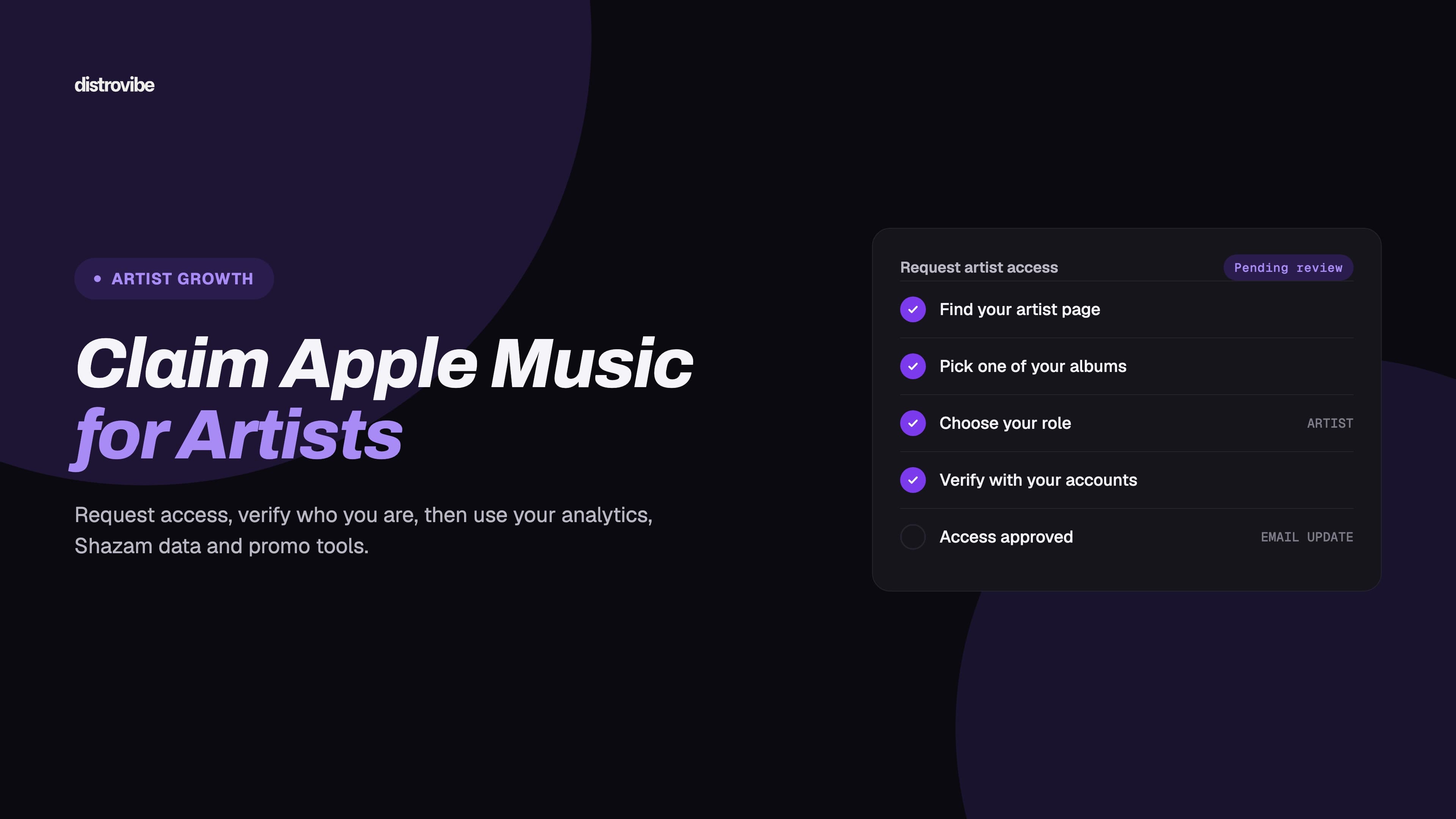
To claim Apple Music for Artists, sign in at artists.apple.com (or in the Apple Music for Artists iOS app) with your Apple Account, click Request Artist Access, paste the link to your Apple Music artist page, pick one of your albums to confirm it is you, choose your role, and fill in the verification form. Your music must have been live on Apple Music for at least five business days, and you must be the primary artist on the album you select. Once Apple approves you, you get free access to streaming and Shazam analytics, artist image upload, promo assets and team management.
Key takeaways
Apple Music for Artists is free and can be claimed once music has been live on Apple Music for at least five business days.
Only the primary artist or the artist's manager can claim an Apple Music artist page; label reps need the artist's approval.
Apple says signing in with a distributor or social account speeds up Apple Music for Artists verification.
If an Apple Music for Artists request has no update after 10 business days, Apple advises contacting its support.
What Apple Music for Artists is (and why claiming it matters)
Apple Music for Artists is Apple's free dashboard for artists and their teams. It is separate from your distributor's dashboard: your distributor delivers your music and pays your royalties, while Apple Music for Artists shows you how that music is performing on Apple Music, iTunes and Shazam, and lets you control how your artist page looks.
Once your profile is claimed you can:
See your analytics — plays, average daily listeners, a real-time "Listening Now" count, iTunes purchases, radio spins, music video views and editorial playlist adds.
See Shazam data — how often your songs are Shazamed, where, and by whom.
Upload your artist image — the profile picture that appears on both Apple Music and Shazam.
Personalize your artist page — add a logo, a button color and spotlighted content.
Create promo assets — ready-made social graphics for new releases, pre-adds and Milestones.
Add your team — give a manager, label contact or designer their own login with the right level of access.
If you have not released on Apple Music yet, there is nothing to claim. Start with our guide on how to get your music on Apple Music, then come back here once your first release has been live for a week.
Before you start: Apple Music for Artists eligibility
Your music has been live for at least five business days. Apple's claim support page states this directly. If your release came out yesterday, wait.
You are the primary artist on at least one album. Featured artists cannot claim an artist page through a release where they are only featured. If you have only ever appeared as "feat." on someone else's track, you need a release of your own first.
You are the artist or the artist's manager. Only artists and artist managers can claim a page. Label representatives need to work with the artist, either by having the artist approve their request or by being invited as a user.
You have an Apple Account.
Your artist name is consistent. The name on Apple Music should match the name on your socials and distributor account. Our music metadata checklist covers why this matters across every store.
How to claim Apple Music for Artists: step by step
Step 1: Copy your Apple Music artist page link
Open Apple Music, go to your artist page (or one of your albums), click or tap More (the three dots), choose Share, then Copy Link. This link is the most reliable way to make sure you claim the right page, especially if another artist shares your name.
Step 2: Sign in and request access
On the web: go to artists.apple.com, sign in with your Apple Account and click Request Artist Access.
On iPhone: download the Apple Music for Artists app from the App Store, sign in and tap Request Artist Access.
Paste your artist page link into the search field.
Step 3: Confirm one of your albums
Apple shows a list of releases on that page. Select one where you are the primary artist. This is Apple's check that you are claiming the correct profile.
Step 4: Choose your role
Pick Artist, Manager or Label Rep. Label Rep requests are reviewed by the artist's existing admins rather than approved straight away, so if the artist has not claimed their page yet, ask them to do that first.
Step 5: Fill in the verification form
This is the part that decides how fast you are approved. Apple needs to confirm your identity or your relationship to the artist, so give it as much evidence as you can (details below).
Step 6: Wait for approval
While your request is under review, its status shows as Pending in Apple Music for Artists. Updates arrive by email, so check your inbox and spam.
Apple Music for Artists verification: what to provide
Apple does not publish a checklist, but its support page is clear on the principle: provide as much detail as possible, and connect accounts where you can. In practice, these are the things that help.
Sign in with your distributor account if it is offered. Apple says signing in to your distributor or social media accounts speeds up verification. A distributor connection is strong proof because it ties you to the account that actually delivered the music.
Connect your social profiles. Instagram, X, Facebook or similar accounts that clearly belong to the artist and use the same artist name.
Add your official website. If it links to your Apple Music page, even better.
Use a matching email. An address on your own domain is more convincing than a random personal one.
Managers: explain the relationship. State that you manage the artist and include details that can be checked, such as your management company's website.
Tip: before you submit, make sure your socials link back to your music. A bio link page or a release SmartLink that includes Apple Music makes the connection obvious to a reviewer.
How long does Apple Music for Artists review take?
Apple does not give a fixed review time for claims. Its FAQ says that if more than 10 business days pass without any update on your request, you should contact Apple Music for Artists support through the Contact Us page. Apple says signing in with a distributor or social account during the request helps it verify you faster, so do that whenever the option appears.
Two other timing rules are worth knowing:
Requests on an already-claimed page can expire. If an artist or manager admin already controls the page and does not act on your request within 30 days, it expires and you need to request again or ask them to invite you directly.
Data starts from Apple's records, not your claim date. Once approved, you are not starting from zero. Your dashboard shows historical data, and new releases or updates take up to 48 hours to appear.
Situation | What to expect | What to do |
|---|---|---|
Release live less than 5 business days | Not eligible yet | Wait, then request access |
Request shows "Pending" | Under review, updates by email | Check your Apple Account inbox and spam |
No update after 10 business days | Longer than Apple expects | Contact Apple Music for Artists support |
Page already claimed by someone else | Their admins must approve you within 30 days | Ask the admin to invite you directly |
Only credited as a featured artist | Cannot claim through that release | Release something as primary artist first |
What you get after approval: analytics, Shazam data and more
Analytics
The Measure section shows plays (sessions longer than 30 seconds, including Apple Music radio station plays), average daily listeners, Listening Now (fans streaming in real time, over the past 48 hours), iTunes song and album purchases, music video views, and radio spins from more than 40,000 tracked terrestrial and digital stations. You can break this down by song, album, playlist and location, and download CSVs for a custom date range. Data is shown in UTC and refreshes daily.
Shazam data
Apple owns Shazam, so its data is built into the dashboard. According to Apple's Shazam for artists support page, you get your Shazam Count and Shazam Insights in the Overview, demographics of people who Shazam your music, the places where you are Shazamed most, and Shazam Charts showing your position in countries, regions and cities over the last seven days. Apple also sends a weekly "Trending on Shazam" email when your music is trending.
A spike in Shazams from one city before streams catch up is an early discovery signal worth acting on. For how Shazam picks up your music in the first place, read how to get on Shazam.
Artist image (your Apple Music artist profile picture)
Admins and Profile Editors can upload an artist image. On the web, go to Artist Content > Artist Page > Edit in the Image section. In the app, tap your artist, tap the ellipsis, tap Account, then the camera button. Once approved, the image appears on both Apple Music and Shazam.
Apple reviews every image, and review can take up to five business days. Follow the artist image guidelines to avoid a rejection:
JPG or PNG, 2400 x 2400 px or larger preferred, 800 x 800 px minimum, and never upscaled.
No text, logos, borders, album cover art, QR codes, URLs or mentions of Apple Music or iTunes.
The image must actually show the artist. Keep faces inside the cropping guides.
Promo assets and shareable Milestones
The Promote section creates social-ready graphics for new releases, pre-adds and Milestones, which are moments like an editorial playlist add or an all-time best. On the web you choose a template (Cover Art, Artist Image or Blur), a background color, one of seven languages, and sizes: Portrait 1080 x 1920, Landscape 1300 x 740 or Square 1080 x 1080. Each asset can include a Linkfire link that points fans to Apple Music and other services.
Team access: adding your manager, label or designer
Once you are an admin, you control who else can see your data. Apple's manage access page describes three roles:
Role | What they can do | Good for |
|---|---|---|
Admin | View analytics, promote content, update the artist page, manage users | The artist and their manager |
Analyst | View data and use Promote | Label contacts, marketing help, booking agents |
Profile Editor | Upload artist images, add and edit lyrics, edit artist details | A designer or assistant who maintains your page |
To invite someone on the web, go to Account, click + in the Users section, enter their email, choose a role and click Invite User. In the app, open the artist, tap the ellipsis, tap Account, then Invite User. Send the invite to the email they use for their Apple Account, because they must sign in with a matching address to accept.
Good practice for teams:
Have at least two admins (for example, the artist and the manager) so you are never locked out.
Give label and agency contacts Analyst, not Admin, unless they really need to manage users.
If you are being flooded with requests, you can turn off "Allow users to request access" in Account settings.
Fixing misattributed releases and wrong artist pages
The most common post-claim surprise is finding someone else's album on your page, or your own release sitting on a different artist's page. This usually happens when two artists share a name. Who fixes it depends on what went wrong.
Your release is on the wrong page (or another artist's release is on yours)
Apple's Apple Music for Artists FAQ says albums from different artists with the same name can end up on one page, and that Apple can either create a new page or move the album to the correct artist page. To request this, contact Apple Music for Artists support, choose Artist Catalog Issues as the topic, and include your approval status, artist name, links to the affected albums and the link to the correct artist page.
At the same time, contact your distributor. Distributors deliver the artist identifiers that tell Apple which page a release belongs on, and they can correct the artist mapping on future deliveries. If the release was delivered as a new artist when it should have gone to your existing page (or the other way around), your distributor can usually fix it with a metadata update.
Wrong metadata: title, release date, capitalization, genre
Apple is clear that changes to release dates, titles and capitalization must come from your distributor or label. You can view metadata in the Music and Videos section of Apple Music for Artists, but you cannot edit it there. Send your distributor the release's UPC, the correct details and a link to the Apple Music page.
Music not live on Apple Music at all
If a release is missing entirely, Apple's support team cannot help. Contact your distributor, since they have the tools and access to check delivery status.
How to prevent it next time
When you upload a new release, choose your existing Apple Music artist profile in your distributor's dashboard instead of creating a new one.
If you share your name with another artist, add something distinctive early (a city, a suffix, a different spelling) rather than after you have built a catalog.
If you are choosing a distributor for your next release, DistroVibe's plans start at $1.99/month with unlimited releases to Apple Music, Shazam and 450+ other platforms.
After you claim: a quick setup checklist
Upload a high-resolution artist image that follows Apple's guidelines.
Invite a second admin.
Check every release on your page belongs to you.
Turn your next Milestone into a social post with the Promote tool.
Set up a pre-release link for your next single so fans can pre-add it on Apple Music. DistroVibe's SmartLinks can do this alongside the other stores.
How to get started on DistroVibe
Getting a release onto Apple Music with DistroVibe, ready to claim, takes six steps.
Create your account on the DistroVibe sign-up page, then enter the six-digit code DistroVibe emails you.
Pick a plan, billed monthly or yearly.
Upload your audio and artwork and fill in the release metadata.
Choose your stores, including Apple Music.
Set your release date and submit for review.
Share a SmartLink, then claim your Apple Music for Artists page five business days after release.
FAQ
Yes. There is no charge to claim your profile or use the dashboard. You only need an Apple Account and music that is live on Apple Music.
No. You must be the primary artist on the album you select during the claim. Release something under your own name first, then claim your page.
Apple does not publish a fixed time. If your request has had no update for more than 10 business days, contact Apple Music for Artists support. Signing in with your distributor or social accounts during the request helps speed things up.
Claim your page, then upload an image under Artist Content > Artist Page on the web, or Account in the app. Review takes up to five business days, and the approved image appears on Apple Music and Shazam.
Yes. You get Shazam counts, Shazam listener demographics, top Shazam locations and Shazam Charts inside the same dashboard. There is no separate Shazam claim process.
Not on its own. Only artists and managers can claim a page. A label rep can request access, but the artist's admins must approve it, or the artist can invite the label as a user.
Claiming your Apple Music for Artists profile takes a few minutes once your music is live, and it starts with a clean, correctly attributed release. If you want a distributor that delivers to Apple Music, Shazam and 450+ other stores while you keep 100% of your streaming royalties, see DistroVibe's plans and pricing, from $1.99/month with unlimited releases, or create your account.